Free Gamepad Tester - PS5, Xbox, Switch & PC Online
Live via HTML5 Gamepad API
Pulls live data from your inputs the moment you connect.
All Supported Devices
Handles PS5, Xbox, Switch, and PC controllers.
Deep Test Suite
Run button and joystick tests to map out accuracy.
Microphone & Vibration
Judge vibration controls and motor strength.
Analog Calibration
Fine-tune dead zones and thresholds.
Raw Numbers That Matter
View axis offsets and response curves.
Stick Drift Fix - Diagnose Your Joystick with a Live Drift Tester
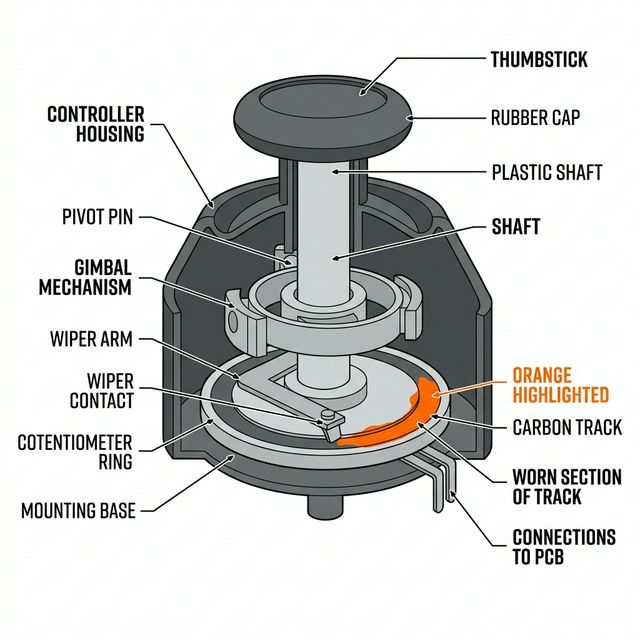
The moment your gamepad starts moving on its own, the first real step is to locate the source, and that's where our online gamepad tester comes in. Using the drift tester, you can verify joystick drift in seconds and identify whether the problem sits in the hardware or software.
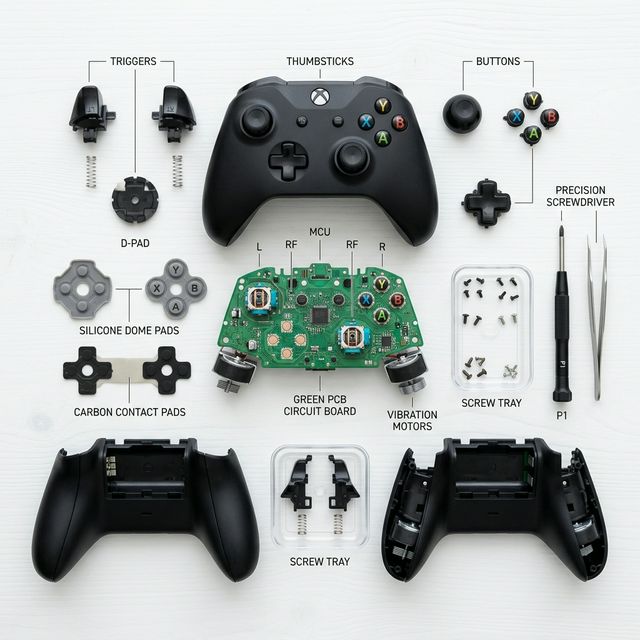
- 1Start by checking if a firmware or drivers update resolves the issue.
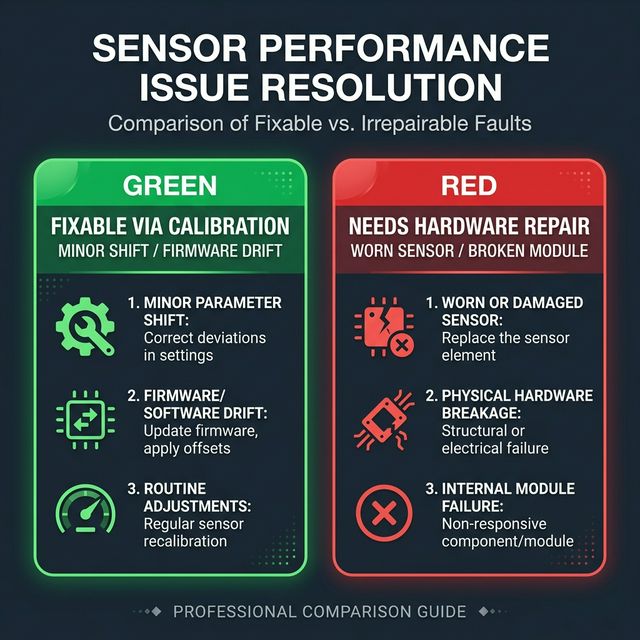
- 2Use the built-in calibration tools to calibrate your controller and adjust sensitivity.
- 3If drift persists, clean the joystick carefully with isopropyl alcohol to clear debris affecting the contacts.
- 4Should that fail, the next step is to replace the joystick modules entirely.
- 5Run a controller button test to catch any faulty buttons, stuck buttons, or unresponsive inputs.
- 6Check the button contacts and worn-out rubber pads, re-solder any damaged connections, replace degraded parts.
- 7Update your controller drivers.
- 8Retest everything using the controller tester to confirm all button issues are resolved before you call it done.
Why This Gamepad Tester Stands Apart
| Feature | What It Means for You |
|---|---|
| Official Gamepad API | Frame-perfect readouts across Windows, macOS, and Linux. No estimation, no averaging. |
| Cross-Platform Browser Support | Runs in Chrome, Edge, or Firefox without any extra software or installation on any desktop OS. |
| No-Install Browser Access | The moment you connect, it visualises every press instantly. No extra software or drivers required. |
| True Drift Detection | Quantifies left and right-stick offset so you're reading real calibration data from the hardware, not guessing. |
| Multi-Controller Support | Connect up to four gamepads at once and monitor them side by side, useful when comparing controllers. |
| All-in-One Toolset | Vibration testing and integrated analog calibration checks, all built straight into the browser. |
| Community Reliability Data | I track anonymous aggregate metrics to help identify which controller models are most prone to hardware fatigue. |
| Troubleshooting Library | Direct links to a growing library of guides covering everything from joystick drift to internal cable repair. |
I built this tool to be a reliable resource for both casual gamers and dedicated modders. It's fully compatible with all major controller brands. You can explore the guide section or use the input lag monitor for fast, accurate answers that save time and money on unnecessary repairs.
Button, Stick & Vibration - Full Controller Test in One Session
Button Response
During any controller test session, this Gamepad Tester lights up every face, shoulder, and trigger input the moment it registers, letting you confirm pressure, travel, and simultaneous presses with the kind of button response clarity that matters most on PC gaming controllers.
Stick Heatmaps & Deadzone Scan
Spin both sticks and the tool instantly plots movement paths that reveal drift and deadzone thresholds, which significantly speeds up the diagnostic process.
Vibration Motor Test
Activate a single burst or continuous rumble through the vibration controller test to check motor strength by feel, giving you a complete picture of how your controller performs across every layer of the test.
Universal Controller Tester - Sony, Microsoft, PC & Beyond
This professional controller test tool offers coverage across Sony, Microsoft, and PC ecosystems, making it the trusted universal controller tester for modders and repair professionals alike. For detailed haptic analysis, check our vibration test module.
| Controller | Connection | Key Features Detected |
|---|---|---|
| PS4 / PS3 | Wired & Bluetooth | Light-bar feedback, motion sensing, analogue face buttons from legacy titles, all fully charted in real time |
| PS5 DualSense | USB / Bluetooth | Adaptive triggers, gyro, advanced haptics, firmware version displayed so you always know when to update |
| Xbox One | USB / Wireless | Vibration motors, bumpers, triggers, and full button mapping supported natively on Windows and Mac |
| Xbox Series | USB / Wireless | Full Series X|S button set including the share button and impulse trigger rumble detection |
| Generic PC Gamepads | USB / Bluetooth | XInput or DirectInput from all major brands, rumble compatibility and D-pad diagonals reported so nothing gets missed |
| Switch Pro | USB / Bluetooth | Full motion sensors and HD-rumble supported readouts, gyro alignment aids that help verify motion accuracy across every input |
From niche devices to mainstream Xbox hardware, this tool is built to handle it all without compromise.
How to Use the Gamepad Tester - Connect, Test & Verify in Minutes
Connect Your Controller
Connect your controller via USB-C, Micro-USB, or Bluetooth pairing, then let the Gamepad API guide the rest, press any button and the Gamepad Tester updates the icon instantly, so if nothing changes, that switch is likely faulty.
Rotate the Joystick
Rotate the joystick and the Gamepad Tester traces a live path of every movement, letting you verify full range and smoothness without any guesswork — something I always do first when diagnosing a controller that feels slightly off.
Run the Vibration Test
Click the vibration test button, select infinite vibration, and the Gamepad Tester engages the motors so you can feel their operation immediately and confirm everything is working as it should.
Quick Fixes When Your Controller Won't Show Up
Close Exclusive-Mode Apps
If Gamepad Tester fails to detect your pad on Windows, close any exclusive-mode apps like Steam Big Picture that may be blocking access, this is the first thing I check and it resolves the issue more often than you'd expect.
Use Chrome or Firefox
On macOS, stick to Chrome or Firefox since Safari only exposes partial Gamepad API events, limiting what the tool can read from your controller. You can verify browser compatibility using our deadzone scan.
Vibration Not Triggering
If vibration fails to trigger, make sure your browser tab is focused and that your system accessibility settings allow haptic feedback, a small tweak that's easy to miss but essential for the Gamepad API to deliver full results.
Get More From Every Test - Advanced Diagnostics Tips
Frequently Asked Questions
Set the controller flat on a desk and leave both sticks completely untouched. Watch the axis values for 10 seconds. If either axis reads consistently above 0.14 without any input, early drift is present. If values reach above 0.25, the drift is advanced enough to visibly affect gameplay. A single spike to 0.03 or 0.04 is normal electrical noise and is not drift.
Yes. All buttons, analog sticks, triggers and touchpad clicks register correctly in Chrome and Edge. DualSense adaptive haptics require Chrome or Edge specifically as Firefox does not have full DualSense haptic API support. The touchpad functions as a clickable button in all browsers rather than as a full touch surface.
Yes. Xbox controllers use XInput which Windows and the browser Gamepad API support natively. All buttons, both analog sticks, both triggers as analog values, bumpers, d-pad and stick click buttons register correctly. The Share button may not register in all browsers due to browser-level limitations, not a controller issue.
A deadzone is an intentional neutral zone built into games where small stick movements near center are ignored. It exists to prevent micro-movements from causing unintended actions. Drift is the opposite: the controller hardware itself is registering movement without any input. This tester shows raw Gamepad API values before any game deadzone is applied, which means you see hardware-level drift even when your game is currently hiding it.
Three situations make testing especially useful. First, before your manufacturer warranty expires. Document axis values above 0.14 and you have evidence for a warranty replacement claim. Second, before buying a used controller. A 60-second test catches hidden drift that the seller may not disclose. Third, after attempting a cleaning fix with isopropyl alcohol. Test the axis values before and after to confirm whether the fix worked.
Work through these in order. Press any button first as browsers require this interaction to activate gamepad detection. Close Steam or the Xbox app completely as they lock controller access. Switch to Chrome or Edge. Plug directly into a rear USB port and bypass any hub. If using Bluetooth, remove the controller from your OS settings entirely and re-pair from scratch.
Below 0.10 is excellent, the stick is centered and stable. Between 0.10 and 0.14 is acceptable but worth retesting in four to six weeks. Consistently above 0.14 means early drift is confirmed. Above 0.25 means the drift will actively move your character or camera in games without any input from you.
Yes on Android with Chrome. Controllers connected via USB-OTG or Bluetooth register correctly. iOS Safari support is limited and unreliable. For the most accurate axis readings and haptic testing, a desktop or laptop with Chrome or Edge gives the best results. Mobile works for basic button and connection checks.
Nothing at all. This tester runs entirely in your browser using the Web Gamepad API, a standard built into Chrome and Edge. No extensions, no downloads, no drivers, no account. Close the tab when you are done and nothing is stored anywhere.