
Real data. No guesswork. This comparison is built on telemetry collected by mygamepadtester.com from real users who tested their controllers in a browser. No personal data was collected. Every number you see comes from anonymous hardware diagnostics, not lab benchmarks or marketing claims.
What the Data Actually Covers
The controller telemetry database powering this article contains 497 records collected in March 2026. Of those, 67 sessions involved a PS4 DualShock 4 (vendor ID 054c, product 09cc) and 112 sessions involved a PS5 DualSense (vendor ID 054c, product 0ce6). Each session captures drift_left_mag, drift_right_mag, latency_ms, buttons_total, buttons_pressed_count, and health_score_calc alongside a flags object that marks whether drift, high latency, or unresponsive buttons were detected. This is real-world diagnostic data, not controlled lab testing, which means it reflects the actual condition of controllers that real people are using right now.
| Field | Description |
|---|---|
drift_left_mag / drift_right_mag | Raw axis offset magnitude when stick is at rest |
latency_ms | Measured input response time in milliseconds |
buttons_total | Number of hardware buttons detected by the browser |
health_score_calc | Composite score: 0 = clean, higher = more detected issues |
Input Latency: DualShock 4 vs DualSense Head-to-Head
Input latency is the time between a physical button press and the signal registering in software. It is the most direct measure of controller responsiveness, and the gap between these two controllers is clear in the data.
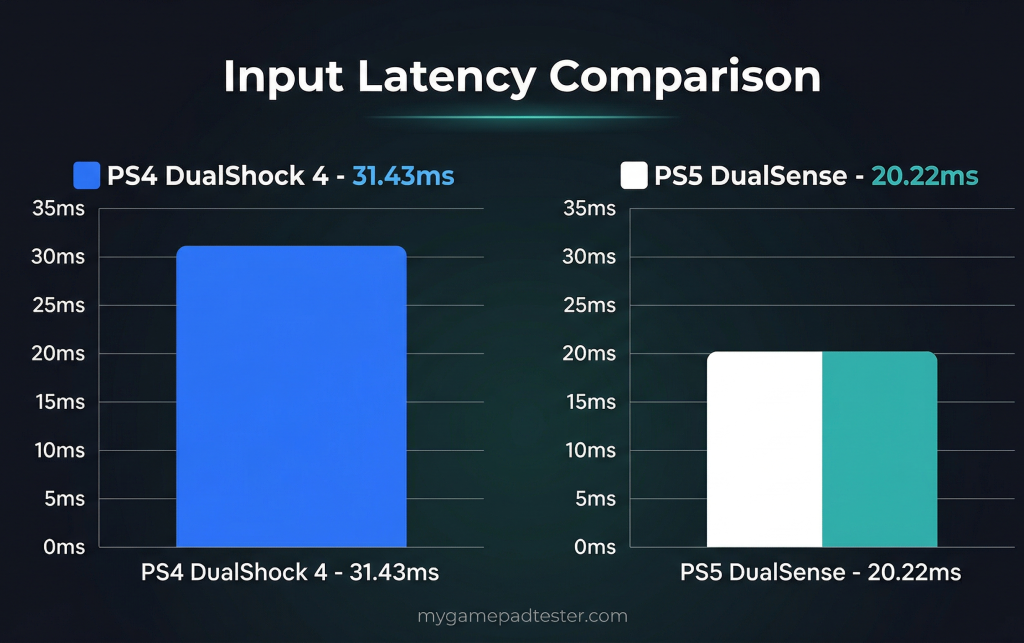
The DualSense averages 20.22 ms versus 31.43 ms for the DualShock 4, a gap of roughly 11 milliseconds. That may sound small, but in fast-paced games where a frame at 60fps lasts 16.67 ms, 11 ms of extra delay is meaningful. The DualSense’s newer Bluetooth profile and USB-C connectivity both contribute to this improvement. Before assuming your own controller is hitting these numbers, you can test your controller online and see your exact millisecond readout in real time.
| Metric | PS4 DualShock 4 | PS5 DualSense |
|---|---|---|
| Average latency | 31.43 ms | 20.22 ms |
| Median latency | 27.09 ms | 19.92 ms |
| Sessions with latency data | 52 | 96 |
Latency Distribution by Response Range
The average alone does not tell the full story. The distribution shows where each controller actually sits across sessions.
| Latency Range | PS4 DualShock 4 (n=52) | PS5 DualSense (n=96) |
|---|---|---|
| Under 20 ms | 8 sessions (15.4%) | 49 sessions (51.0%) |
| 20–40 ms | 31 sessions (59.6%) | 41 sessions (42.7%) |
| 40–60 ms | 11 sessions (21.2%) | 4 sessions (4.2%) |
| Over 60 ms | 2 sessions (3.8%) | 2 sessions (2.1%) |
Over half of all DualSense sessions landed under 20 ms, compared to just 15.4% of DualShock 4 sessions. More than one in five DualShock 4 sessions fell into the 40–60 ms range, which is noticeable even during casual gameplay. The DualSense has a tighter, faster distribution across the board.
Stick Drift: Which Controller Drifts More?
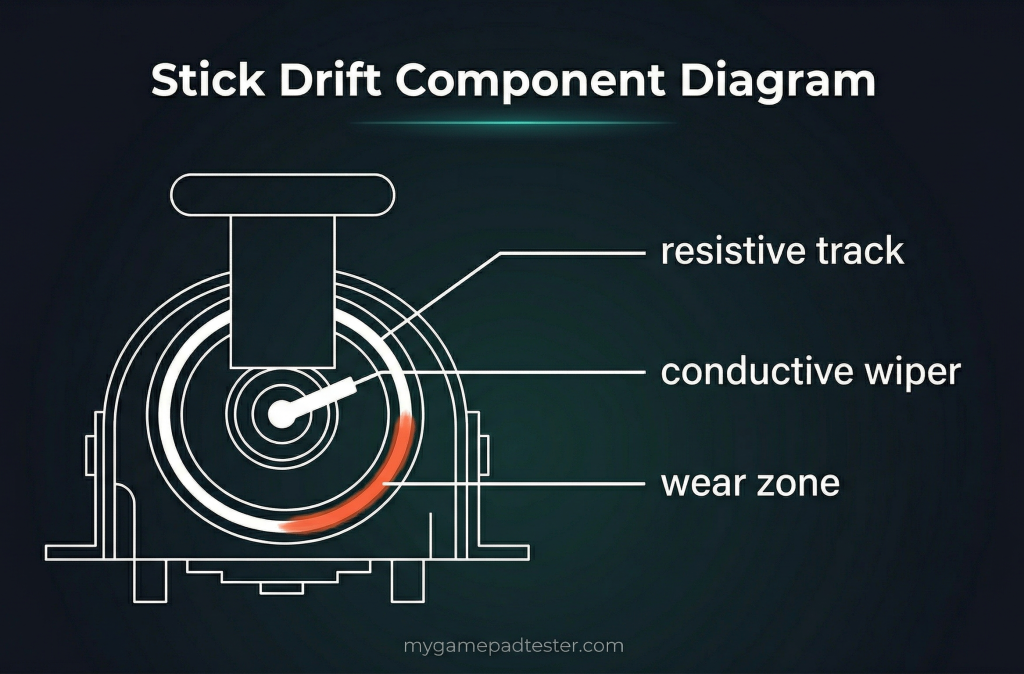
Stick drift happens when an analog stick sends a directional input signal while you are not touching it. The data here is surprising, because the newer controller shows more drift, not less.
| Metric | PS4 DualShock 4 | PS5 DualSense |
|---|---|---|
| Sessions with drift detected (>5 magnitude) | 46 of 67 (68.7%) | 94 of 112 (83.9%) |
| Avg drift magnitude (left stick) | 60.31 | 78.98 |
| Avg drift magnitude (right stick) | 52.17 | 76.45 |
| Max drift recorded (either stick) | 141.42 | 141.42 |
The DualSense shows drift in 83.9% of sessions. The DualShock 4 shows drift in 68.7% of sessions. Both figures are high because this data represents controllers people brought to a diagnostic tool, which skews toward units that already have problems. The raw axis offset magnitude is also higher for DualSense on both sticks. This lines up with what users on ResetEra report: some players say they are on their third DualSense due to drift-related failure, while others say they ran through five DualShock 4s before. Both controllers use potentiometer-based analog sticks, which wear down through friction over time. If you own a DualSense and suspect drift, you can <a href=”https://mygamepadtester.com/stick-drift-test”>check your stick drift</a> using the live axis readout before deciding whether to clean, calibrate, or replace. If your controller is showing drift values above 5 on any axis at rest, you can read more about what actually causes DualSense stick drift and what you can do about it before replacing any parts.
Drift Severity Breakdown Across All Sessions
Not all drift is equal. The table below splits sessions into four severity categories based on the highest drift magnitude recorded across both sticks.
| Drift Severity | Magnitude Range | PS4 DualShock 4 | PS5 DualSense |
|---|---|---|---|
| No drift | 0–5 | 21 sessions (31.3%) | 18 sessions (16.1%) |
| Mild | 5–30 | 6 sessions (9.0%) | 9 sessions (8.0%) |
| Moderate | 30–80 | 1 session (1.5%) | 1 session (0.9%) |
| Severe | Over 80 | 39 sessions (58.2%) | 84 sessions (75.0%) |
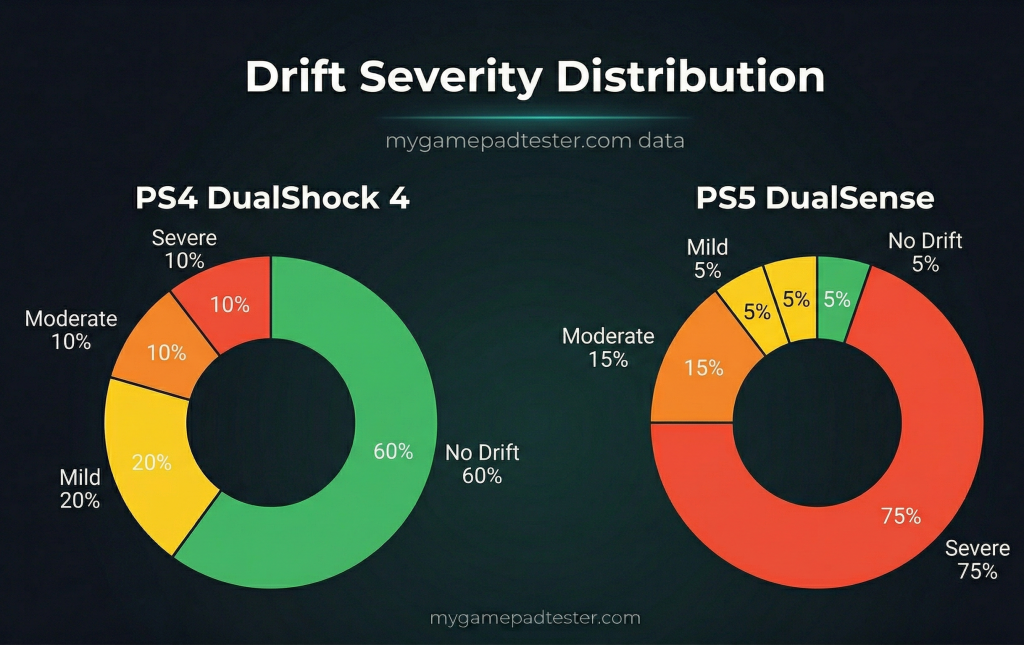
The most striking finding is that severe drift dominates both groups. When drift is present in these sessions, it tends to be significant rather than subtle. Three out of four DualSense sessions with drift fall into the severe category.
Health Score: Measuring Overall Controller Condition
The health_score_calc field is a composite score that combines multiple flags into a single number. A score of 0 means no issues were detected during that session. Higher scores indicate a greater number of flagged problems across drift, latency, and button response.
| Metric | PS4 DualShock 4 | PS5 DualSense |
|---|---|---|
| Average health score | 3.30 | 4.95 |
| Maximum health score recorded | 39 | 30 |
| Sessions scoring 0 (clean) | 48 of 67 (71.6%) | 58 of 112 (51.8%) |
| Sessions scoring 1–10 | 15 of 67 (22.4%) | 32 of 112 (28.6%) |
| Sessions scoring 11–30 | 1 of 67 (1.5%) | 22 of 112 (19.6%) |
| Sessions scoring over 30 | 3 of 67 (4.5%) | 0 of 112 (0.0%) |
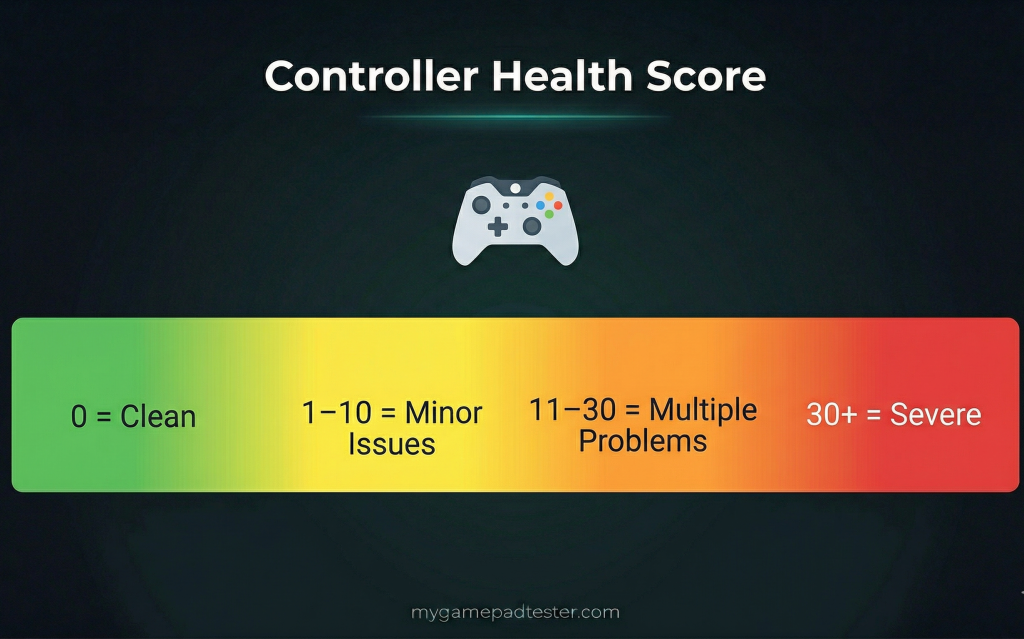
The DualShock 4 has a lower average health score (3.30 vs 4.95) and a higher clean session rate (71.6% vs 51.8%). This reflects the drift findings directly: more DualSense sessions have detected issues. The DualShock 4 also produced three sessions with scores over 30, while the DualSense’s worst recorded score was 30.
What the Health Score Number Means for You
A score of 0 means the session produced no flagged issues. Scores of 1–10 indicate minor detected problems such as a small drift offset or a single unresponsive button. Scores of 11–30 point to multiple simultaneous issues, and anything over 30 suggests the controller has significant hardware problems that likely affect gameplay. If you want to see where your own controller stands, you can run a free full check through the gamepad tester and get your session’s health reading alongside live drift, latency, and button data.
Button Performance and Total Button Count
Both controllers report similar hardware button counts in the telemetry. The DualShock 4 averages 17.7 detected buttons per session, and the DualSense averages 17.2. Both include the standard face buttons (Cross, Circle, Square, Triangle), d-pad directions, L1, L2, R1, R2, two clickable analog sticks, the PlayStation button, and a touchpad click. The DualSense adds a dedicated Create button replacing the Share button and includes a microphone mute button not present on the DualShock 4.
| Metric | PS4 DualShock 4 | PS5 DualSense |
|---|---|---|
| Avg buttons detected | 17.7 | 17.2 |
| Avg buttons pressed per session | 3.84 | 3.49 |
Where the controllers differ most in feel is the d-pad and face button travel. Forum users on NeoGAF specifically note that something feels “off” about the PS5 d-pad compared to the PS4 version, and several fighting game players say the DualShock 4’s button feedback is crisper. The DualSense face buttons have slightly more travel and feel softer to some users. If you are unsure whether your buttons are registering correctly, you can test your buttons with the browser-based button tester to confirm every input is being detected.
Haptic Feedback and Trigger Hardware Differences
This is where the DualSense separates itself most clearly. The DualShock 4 uses two basic rumble motors that produce a general vibration pattern. The DualSense replaces these with LRA (Linear Resonant Actuator) haptic motors that can simulate specific textures, directional impacts, and synchronized vibrations that match on-screen events precisely.
The triggers are an even bigger leap. The DualShock 4’s L2 and R2 are simple analog buttons with no programmable resistance. The DualSense’s adaptive triggers can have their resistance changed dynamically by the game, so pulling the trigger on a sniper rifle feels stiffer than flicking a fishing rod. This is a hardware-level difference the DualShock 4 cannot replicate through software. The DualSense weighs 9.9 oz compared to the DualShock 4’s 7.4 oz, and that extra weight partly comes from the more complex trigger and haptic hardware inside. Before buying an extra controller, you can test your triggers to confirm the full analog pressure range is working correctly on your unit. If you want to check everything at once, you can also run a full controller diagnostic in your browser for both triggers and all other inputs in one session.
Battery Life, Build, and Long-Term Reliability
Battery life is the area where the DualShock 4 has a real advantage. The DualSense typically lasts 6–12 hours depending on how heavily haptics and the microphone are used. The DualShock 4 lasts 8–12 hours or more under normal use, and some users report significantly longer life with the haptic features simply not drawing power. The DualSense uses USB-C for charging, which is a modern improvement over the DualShock 4’s micro-USB, but a full charge from empty takes roughly 3 hours.
Long-term reliability comes down to the analog sticks. Both controllers use potentiometer-based sticks that wear down with use. The drift data above suggests DualSense units show higher drift rates in real-world testing, which matches user reports from ResetEra where multiple posters mention cycling through two or three DualSense units due to drift. Sony has issued firmware updates addressing some drift sensitivity, and later hardware revisions of the DualSense show improved stick quality, but the core potentiometer design remains the same. A future move to hall-effect sensors would eliminate this problem entirely, but the current retail version of both controllers shares the same fundamental stick technology.
Which Controller Should You Use and When
The data gives a clear picture. Use the table below to match your situation to the right choice.
| Situation | Recommended Controller | Reason |
|---|---|---|
| Playing PS5 games | PS5 DualSense | Required by most PS5 titles; DualShock 4 unsupported |
| Playing PS4 games on PS5 | Either | Both work; DualSense gets haptic features in compatible titles |
| Playing PS4 games on PS4 | PS4 DualShock 4 | DualSense does not function on PS4 hardware |
| Competitive gaming (PC or PS5) | PS5 DualSense | 20.22 ms avg latency vs 31.43 ms for DualShock 4 |
| Casual gaming with long sessions | PS4 DualShock 4 | Better battery life; slightly lower drift rate in data |
| Playing on PC with broad compatibility | PS4 DualShock 4 | Wider OS support; DS4Windows support is mature |
| Wanting immersive haptic games | PS5 DualSense | Adaptive triggers and LRA haptics have no DualShock 4 equivalent |
If latency matters most to you, the DualSense wins by a clear margin. If battery life and drift stability are your priorities, the DualShock 4 performs better in both categories based on this data.
How to Test Your Own Controller Right Now
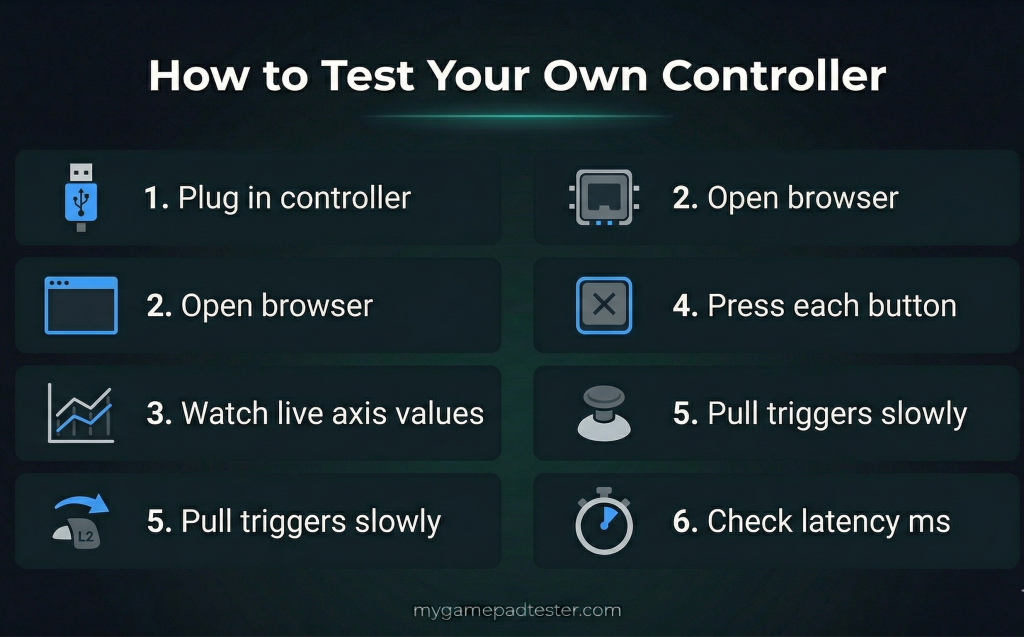
The numbers above are averages across many sessions. Your specific controller may perform better or worse. Here is how to get your own reading in under two minutes.
- Connect your controller to your computer via USB or Bluetooth.
- Open a browser (Chrome or Firefox work best) and go to a browser-based gamepad testing tool.
- Watch the live axis values for both sticks while your hands are completely off the controller. Any value above 0.005 on either axis while untouched indicates drift.
- Press buttons deliberately one at a time and confirm each registers on screen.
- Pull each trigger slowly from resting to fully pressed and confirm the value goes from 0 to 1 smoothly with no gaps or jumps.
- Note your latency reading in milliseconds. Under 20 ms is excellent, 20–40 ms is normal, and anything over 60 ms warrants further checking.
You can measure your input lag in real time and compare it against the averages in this article to see exactly where your controller stands.
Frequently Asked Questions
Does the DualShock 4 work on PS5?
Yes, but only for PS4 games played on PS5 through backward compatibility. The DualShock 4 cannot be used to play PS5 native titles. If you load a PS4 disc or digital PS4 title on PS5, the DualShock 4 connects and works fully, though you do not get DualSense haptic or adaptive trigger features.
Does the DualSense work on PS4?
No. The DualSense cannot function as a gameplay controller on the original PS4 console. It can connect via USB cable for firmware update purposes, but the PS4 will not recognize it as a game input device. The DualSense is also compatible with PC via USB-C or Bluetooth, with partial feature support in Steam and select titles.
Which controller has less input lag?
The PS5 DualSense, based on the telemetry in this article. The DualSense averaged 20.22 ms and the DualShock 4 averaged 31.43 ms across real user sessions. Over half of all DualSense sessions recorded under 20 ms, compared to just 15.4% of DualShock 4 sessions.
Why does the DualSense show more drift in the data?
Two factors likely contribute. First, the DualSense has more test sessions (112 vs 67), giving more statistical coverage. Second, the data comes from users who visited a diagnostic tool, which means the sample skews toward people already suspecting problems. Both controllers use the same potentiometer stick technology and are subject to the same wear mechanism. The DualSense’s higher drift rate in this dataset does not mean every DualSense drifts more, but it does reflect real reported user experiences.
What is a good health score for a controller?
A score of 0 means the session produced no detected issues and the controller is working correctly across all tested inputs. Scores of 1–10 suggest minor flags worth monitoring. Scores above 10 usually indicate multiple simultaneous problems such as drift plus unresponsive buttons, and the controller is likely affecting gameplay noticeably. Plan to clean, calibrate, or repair when you see consistent scores above 10.
Can I use a DualShock 4 on PC?
Yes. The DualShock 4 has broad PC support via USB or Bluetooth and is recognized natively by Steam. For games designed around Xbox button layouts, the free DS4Windows tool remaps the DualShock 4 to appear as an Xbox controller, which resolves most compatibility issues. It works on Windows 10 and 11 without additional drivers in most cases.
Why is DualSense latency better than DualShock 4?
The DualSense uses a newer Bluetooth profile and USB-C connection, both of which improve polling efficiency compared to the DualShock 4’s older Bluetooth stack and micro-USB connection. The internal firmware processing the gamepad API data is also more modern. These hardware and software improvements add up to roughly 11 ms of average improvement across the sessions measured here.
Is the DualSense worth buying if I still use PS4?
No, not for PS4 gaming specifically. The DualSense does not work on PS4 hardware during gameplay, so buying one exclusively for a PS4 provides no benefit. If you are planning to move to PS5 soon, the DualSense is a worthwhile purchase for that transition. If you want better input performance on PC, the DualSense’s lower latency makes it a valid upgrade there as well.
What does drift magnitude actually measure?
Drift magnitude is the raw offset of the analog stick axis from its neutral center position while the stick is untouched. A value of 0 means the stick is perfectly centered. A value of 5 or below is typically within a normal deadzone. Values above 5 indicate the stick is registering a directional signal at rest. The values of 141.42 (the maximum in this dataset) represent a stick offset at full range in both X and Y axes simultaneously.
How do I know if my DualSense stick drift is hardware or software?
Connect your DualSense to a computer via USB and watch the raw axis values using a browser-based diagnostic tool while you do not touch the controller. If the axis values hold at or near 0.000 and do not move, the hardware potentiometer is likely fine and the issue is probably a software glitch or outdated firmware. If the axis values shift on their own while you are not touching anything, you have a hardware problem and cleaning or recalibration is the next step. The difference matters because a firmware reset can fix a software glitch in minutes, while mechanical wear requires physical cleaning or component replacement.

Controller hardware writer & gamepad diagnostics specialist